Cart
Cart drawer, notifications, reward tiers, recommendations and notes.
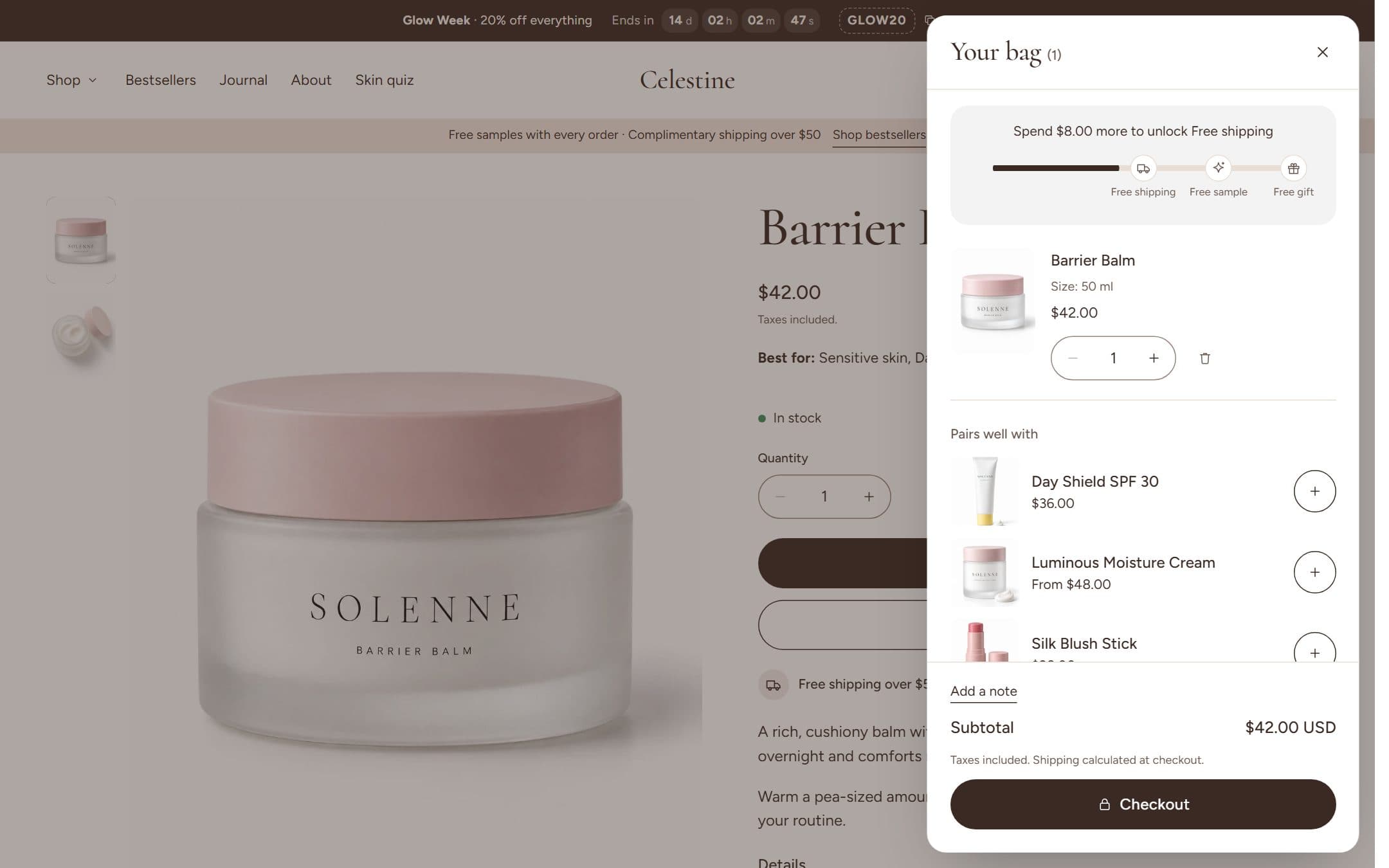
After adding to cart
| Option | What happens |
|---|---|
| Open the cart drawer | A drawer slides in with the cart, rewards and recommendations |
| Show a notification | A small confirmation appears; the customer keeps browsing |
| Go to the cart page | The customer lands on the full cart page |
Reward tiers
Show progress towards up to three rewards (for example free shipping at $50, a free sample at $75, a gift at $100). Set each tier's amount, label and icon in Theme settings → Cart. Amounts convert automatically for customers shopping in other currencies.
The bar only shows progress. Create the actual rewards in Shopify (a free shipping discount, or an automatic discount for the gift) so they apply at checkout.
Recommendations, notes and checkout
- Recommendations: related products in the drawer and on the cart page. Choose related or complementary products.
- Empty cart: pick a collection to suggest when the cart is empty.
- Order notes: let customers add a note for the order.
- Dynamic checkout buttons: Shop Pay, Apple Pay and others, shown under the checkout button.
- Quantities respect stock limits and quantity rules, with an inline message when a customer asks for more than you have.